Quickstart
You should already have installed the package and downloaded at least one checkpoint.
Single-image segmentation
from strands_sapiens import sapiens_seg

result = sapiens_seg(
    input_path="/path/to/person.jpg",
    output_dir="./out",
    model_size="0.4b",
    save_pred=True,
)
print(result["status"])  # "success"
You'll get, per image:
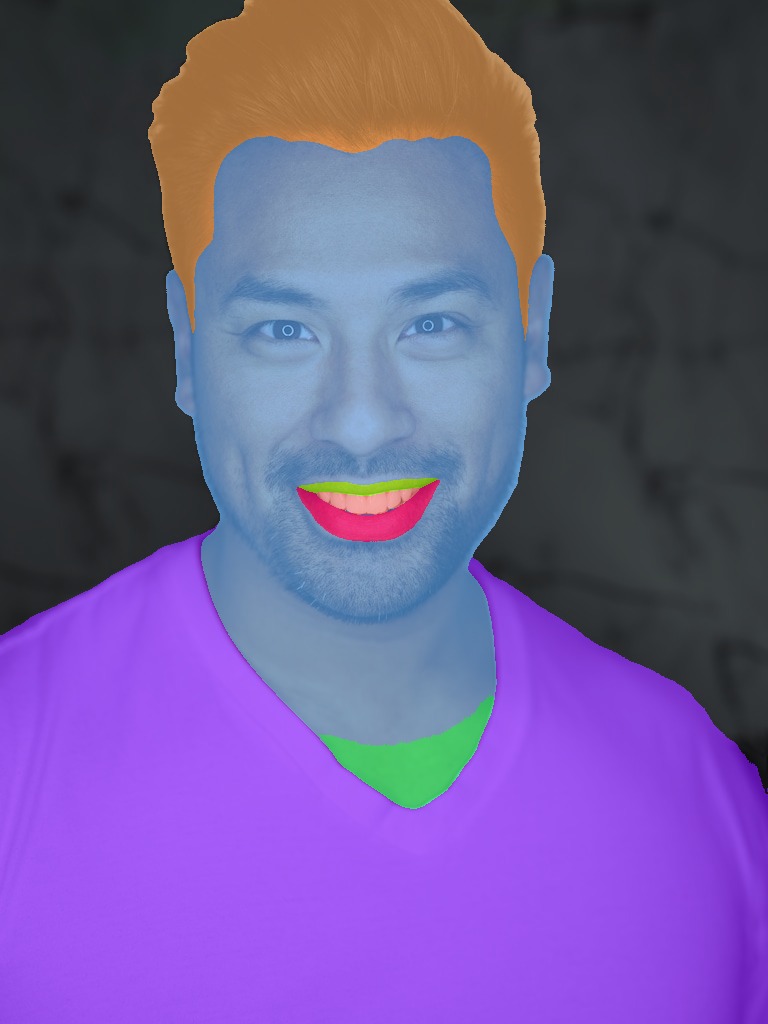
./out/person.jpg— side-by-side input + segmentation viz./out/person_seg.npy— rawH×Wclass-index map (29 classes)
Batch over a folder
Picks up .jpg/.jpeg/.png/.webp/.bmp/.tif/.tiff from the folder.
Use from a Strands agent
from strands import Agent
from strands_sapiens import TOOLS

agent = Agent(tools=TOOLS)
agent("Segment every person in ./photos and save to ./out")
The agent will:
- Call
sapiens_infoto see what's available. - Pick the best size it has a checkpoint for.
- Call
sapiens_segwith the right paths. - Return a summary of the output files.
Chain multiple heads
from strands_sapiens import sapiens_seg, sapiens_normal, sapiens_pose

for tool in (sapiens_seg, sapiens_normal, sapiens_pose):
    tool(input_path="person.jpg", output_dir=f"out/{tool.__name__}")
Structured response
Every tool returns the standard Strands ToolResult format:
{
    "status": "success",          # or "error"
    "content": [
        {"text": "seg complete on 1 image(s)"},          # summary
        {"image": {"format": "jpeg", "source": {"bytes": b"..."}}},  # inline vis
        {"json": {                                        # structured data
            "task": "seg",
            "model_size": "0.4b",
            "checkpoint": "/.../sapiens2_0.4b_seg.safetensors",
            "output_dir": "./out",
            "outputs": [
                {"input": "person.jpg", "vis": "./out/person.jpg", "pred": "./out/person_seg.npy"}
            ]
        }}
    ]
}
The agent can read the text summary, see inline visualizations, and parse structured JSON for downstream chaining.
On error, content contains a text message and optionally a json block with traceback.