What you need·
scout is two machines and a handful of accounts. Everything below is what the code in this repo actually expects
(.env.example, docker-compose.slim.yml, Makefile).
The body — FrodoBots Earth Rover Mini+·
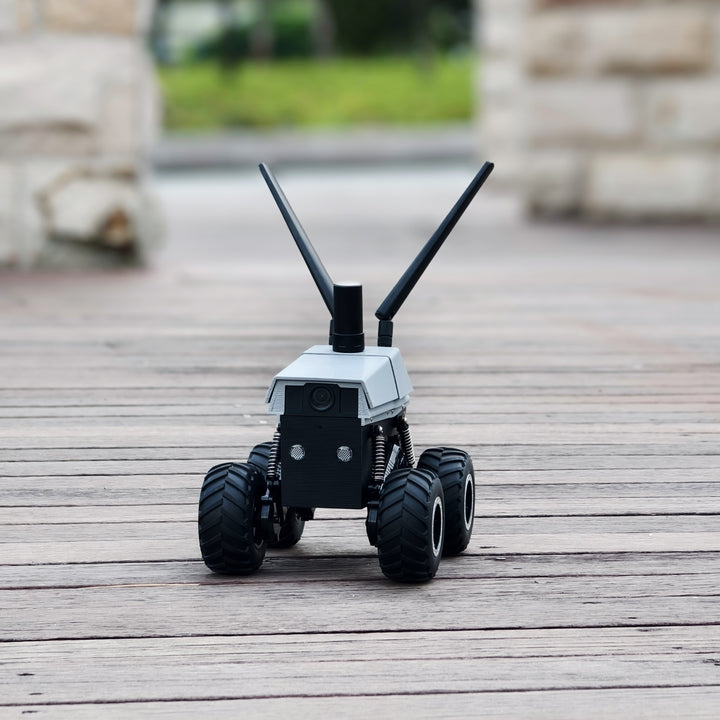
A four-wheel skid-steer rover with a front + rear camera, mic, speaker, headlamp, GPS, IMU + magnetometer, per-wheel RPM
and a 4G/Wi-Fi link to FrodoBots' cloud. You never talk to the rover directly: the
Earth Rovers SDK (our fork) runs a headless Chromium that joins the rover's
Agora WebRTC channel and exposes it as plain HTTP — /control, /data, /v2/front, /v2/rear, /speak, /rover-mic, /rover-speaker.
Accounts you need
- A FrodoBots account with the rover registered — gives you
SDK_API_TOKENand the rover'sBOT_SLUG. - A model provider: AWS Bedrock by default (
STRANDS_MODEL_ID, boto3 credential chain orAWS_BEARER_TOKEN_BEDROCK); OpenAI for the Realtime voice (OPENAI_API_KEY); optionally Google for Gemini Live. - A Telegram bot from @BotFather if you want to drive from your pocket.
- A Cloudflare account if you want a public hostname (free tunnel, real TLS).
The brain — a box that runs docker·
The reference deployment is an NVIDIA Jetson AGX Thor ("Thor") on the same Wi-Fi as the rover, but the slim stack
(scout:slim, python:3.12-slim, CPU only) is deliberately portable:
slim scout:slim (recommended) |
GPU scout:latest |
|
|---|---|---|
| base image | python:3.12-slim |
vllm/vllm-omni:cosmos3 |
| needs | docker + compose, ~16 GB disk, arm64 or amd64 | NVIDIA GPU, ~50 GB |
| Cosmos world-model tools | ❌ gracefully absent | ✅ on-GPU |
| dataset recording (LeRobot) | ✅ (INSTALL_LEROBOT=0 to drop) |
✅ |
| everything else (agent, cockpit, personas, YOLO, voice) | ✅ | ✅ |
Chromium, CPU torch, lerobot, node 22 + the vendored tiny-tech MCP server are all baked into the image — the host needs
nothing but docker (and python3 for the optional host-side persona supervisor).
The controller — optional·
A PS4 controller (or anything pygame sees) turns on teleop recording: controller_start streams sticks → /control
at ROVER_CONTROLLER_HZ and records the drive as a dataset episode. Not required; the cockpit's glass joystick does the same
from a phone.
The phone / laptop·
Anything with a modern browser. The cockpit is a PWA — on iOS Share → Add to Home Screen gives a full-screen app with Face ID passkeys. WebAuthn needs HTTPS and a hostname (never a raw IP) — see Auth.